

Note
Go to the end to download the full example code.
Skore: getting started#
This guide illustrates how to use skore through a complete machine learning workflow for binary classification:
Set up a proper experiment with training and test data
Develop and evaluate multiple models using cross-validation
Compare models to select the best one
Validate the final model on held-out data
Track and organize your machine learning results
Throughout this guide, we will see how skore helps you:
Avoid common pitfalls with smart diagnostics
Quickly get rich insights into model performance
Organize and track your experiments
Setting up our binary classification problem#
Let’s start by loading the German credit dataset, a classic binary classification problem where we predict the customer’s credit risk (“good” or “bad”).
This dataset contains various features about credit applicants, including personal information, credit history, and loan details.
import pandas as pd
import skore
from sklearn.datasets import fetch_openml
from skrub import TableReport

german_credit = fetch_openml(data_id=31, as_frame=True, parser="pandas")
X, y = german_credit.data, german_credit.target
TableReport(german_credit.frame)
| checking_status | duration | credit_history | purpose | credit_amount | savings_status | employment | installment_commitment | personal_status | other_parties | residence_since | property_magnitude | age | other_payment_plans | housing | existing_credits | job | num_dependents | own_telephone | foreign_worker | class | |
|---|---|---|---|---|---|---|---|---|---|---|---|---|---|---|---|---|---|---|---|---|---|
| 0 | <0 | 6 | critical/other existing credit | radio/tv | 1,169 | no known savings | >=7 | 4 | male single | none | 4 | real estate | 67 | none | own | 2 | skilled | 1 | yes | yes | good |
| 1 | 0<=X<200 | 48 | existing paid | radio/tv | 5,951 | <100 | 1<=X<4 | 2 | female div/dep/mar | none | 2 | real estate | 22 | none | own | 1 | skilled | 1 | none | yes | bad |
| 2 | no checking | 12 | critical/other existing credit | education | 2,096 | <100 | 4<=X<7 | 2 | male single | none | 3 | real estate | 49 | none | own | 1 | unskilled resident | 2 | none | yes | good |
| 3 | <0 | 42 | existing paid | furniture/equipment | 7,882 | <100 | 4<=X<7 | 2 | male single | guarantor | 4 | life insurance | 45 | none | for free | 1 | skilled | 2 | none | yes | good |
| 4 | <0 | 24 | delayed previously | new car | 4,870 | <100 | 1<=X<4 | 3 | male single | none | 4 | no known property | 53 | none | for free | 2 | skilled | 2 | none | yes | bad |
| 995 | no checking | 12 | existing paid | furniture/equipment | 1,736 | <100 | 4<=X<7 | 3 | female div/dep/mar | none | 4 | real estate | 31 | none | own | 1 | unskilled resident | 1 | none | yes | good |
| 996 | <0 | 30 | existing paid | used car | 3,857 | <100 | 1<=X<4 | 4 | male div/sep | none | 4 | life insurance | 40 | none | own | 1 | high qualif/self emp/mgmt | 1 | yes | yes | good |
| 997 | no checking | 12 | existing paid | radio/tv | 804 | <100 | >=7 | 4 | male single | none | 4 | car | 38 | none | own | 1 | skilled | 1 | none | yes | good |
| 998 | <0 | 45 | existing paid | radio/tv | 1,845 | <100 | 1<=X<4 | 4 | male single | none | 4 | no known property | 23 | none | for free | 1 | skilled | 1 | yes | yes | bad |
| 999 | 0<=X<200 | 45 | critical/other existing credit | used car | 4,576 | 100<=X<500 | unemployed | 3 | male single | none | 4 | car | 27 | none | own | 1 | skilled | 1 | none | yes | good |
checking_status
CategoricalDtype- Null values
- 0 (0.0%)
- Unique values
- 4 (0.4%)
Most frequent values
duration
Int64DType- Null values
- 0 (0.0%)
- Unique values
- 33 (3.3%)
- Mean ± Std
- 20.9 ± 12.1
- Median ± IQR
- 18 ± 12
- Min | Max
- 4 | 72
credit_history
CategoricalDtype- Null values
- 0 (0.0%)
- Unique values
- 5 (0.5%)
Most frequent values
purpose
CategoricalDtype- Null values
- 0 (0.0%)
- Unique values
- 10 (1.0%)
Most frequent values
credit_amount
Int64DType- Null values
- 0 (0.0%)
- Unique values
-
921 (92.1%)
This column has a high cardinality (> 40).
- Mean ± Std
- 3.27e+03 ± 2.82e+03
- Median ± IQR
- 2,320 ± 2,606
- Min | Max
- 250 | 18,424
savings_status
CategoricalDtype- Null values
- 0 (0.0%)
- Unique values
- 5 (0.5%)
Most frequent values
employment
CategoricalDtype- Null values
- 0 (0.0%)
- Unique values
- 5 (0.5%)
Most frequent values
installment_commitment
Int64DType- Null values
- 0 (0.0%)
- Unique values
- 4 (0.4%)
- Mean ± Std
- 2.97 ± 1.12
- Median ± IQR
- 3 ± 2
- Min | Max
- 1 | 4
personal_status
CategoricalDtype- Null values
- 0 (0.0%)
- Unique values
- 4 (0.4%)
Most frequent values
other_parties
CategoricalDtype- Null values
- 0 (0.0%)
- Unique values
- 3 (0.3%)
Most frequent values
residence_since
Int64DType- Null values
- 0 (0.0%)
- Unique values
- 4 (0.4%)
- Mean ± Std
- 2.85 ± 1.10
- Median ± IQR
- 3 ± 2
- Min | Max
- 1 | 4
property_magnitude
CategoricalDtype- Null values
- 0 (0.0%)
- Unique values
- 4 (0.4%)
Most frequent values
age
Int64DType- Null values
- 0 (0.0%)
- Unique values
-
53 (5.3%)
This column has a high cardinality (> 40).
- Mean ± Std
- 35.5 ± 11.4
- Median ± IQR
- 33 ± 15
- Min | Max
- 19 | 75
other_payment_plans
CategoricalDtype- Null values
- 0 (0.0%)
- Unique values
- 3 (0.3%)
Most frequent values
housing
CategoricalDtype- Null values
- 0 (0.0%)
- Unique values
- 3 (0.3%)
Most frequent values
existing_credits
Int64DType- Null values
- 0 (0.0%)
- Unique values
- 4 (0.4%)
- Mean ± Std
- 1.41 ± 0.578
- Median ± IQR
- 1 ± 1
- Min | Max
- 1 | 4
job
CategoricalDtype- Null values
- 0 (0.0%)
- Unique values
- 4 (0.4%)
Most frequent values
num_dependents
Int64DType- Null values
- 0 (0.0%)
- Unique values
- 2 (0.2%)
- Mean ± Std
- 1.16 ± 0.362
- Median ± IQR
- 1 ± 0
- Min | Max
- 1 | 2
own_telephone
CategoricalDtype- Null values
- 0 (0.0%)
- Unique values
- 2 (0.2%)
Most frequent values
foreign_worker
CategoricalDtype- Null values
- 0 (0.0%)
- Unique values
- 2 (0.2%)
Most frequent values
class
CategoricalDtype- Null values
- 0 (0.0%)
- Unique values
- 2 (0.2%)
Most frequent values
No columns match the selected filter: . You can change the column filter in the dropdown menu above.
| Column | Column name | dtype | Is sorted | Null values | Unique values | Mean | Std | Min | Median | Max |
|---|---|---|---|---|---|---|---|---|---|---|
| 0 | checking_status | CategoricalDtype | False | 0 (0.0%) | 4 (0.4%) | |||||
| 1 | duration | Int64DType | False | 0 (0.0%) | 33 (3.3%) | 20.9 | 12.1 | 4 | 18 | 72 |
| 2 | credit_history | CategoricalDtype | False | 0 (0.0%) | 5 (0.5%) | |||||
| 3 | purpose | CategoricalDtype | False | 0 (0.0%) | 10 (1.0%) | |||||
| 4 | credit_amount | Int64DType | False | 0 (0.0%) | 921 (92.1%) | 3.27e+03 | 2.82e+03 | 250 | 2,320 | 18,424 |
| 5 | savings_status | CategoricalDtype | False | 0 (0.0%) | 5 (0.5%) | |||||
| 6 | employment | CategoricalDtype | False | 0 (0.0%) | 5 (0.5%) | |||||
| 7 | installment_commitment | Int64DType | False | 0 (0.0%) | 4 (0.4%) | 2.97 | 1.12 | 1 | 3 | 4 |
| 8 | personal_status | CategoricalDtype | False | 0 (0.0%) | 4 (0.4%) | |||||
| 9 | other_parties | CategoricalDtype | False | 0 (0.0%) | 3 (0.3%) | |||||
| 10 | residence_since | Int64DType | False | 0 (0.0%) | 4 (0.4%) | 2.85 | 1.10 | 1 | 3 | 4 |
| 11 | property_magnitude | CategoricalDtype | False | 0 (0.0%) | 4 (0.4%) | |||||
| 12 | age | Int64DType | False | 0 (0.0%) | 53 (5.3%) | 35.5 | 11.4 | 19 | 33 | 75 |
| 13 | other_payment_plans | CategoricalDtype | False | 0 (0.0%) | 3 (0.3%) | |||||
| 14 | housing | CategoricalDtype | False | 0 (0.0%) | 3 (0.3%) | |||||
| 15 | existing_credits | Int64DType | False | 0 (0.0%) | 4 (0.4%) | 1.41 | 0.578 | 1 | 1 | 4 |
| 16 | job | CategoricalDtype | False | 0 (0.0%) | 4 (0.4%) | |||||
| 17 | num_dependents | Int64DType | False | 0 (0.0%) | 2 (0.2%) | 1.16 | 0.362 | 1 | 1 | 2 |
| 18 | own_telephone | CategoricalDtype | False | 0 (0.0%) | 2 (0.2%) | |||||
| 19 | foreign_worker | CategoricalDtype | False | 0 (0.0%) | 2 (0.2%) | |||||
| 20 | class | CategoricalDtype | False | 0 (0.0%) | 2 (0.2%) |
No columns match the selected filter: . You can change the column filter in the dropdown menu above.
checking_status
CategoricalDtype- Null values
- 0 (0.0%)
- Unique values
- 4 (0.4%)
Most frequent values
duration
Int64DType- Null values
- 0 (0.0%)
- Unique values
- 33 (3.3%)
- Mean ± Std
- 20.9 ± 12.1
- Median ± IQR
- 18 ± 12
- Min | Max
- 4 | 72
credit_history
CategoricalDtype- Null values
- 0 (0.0%)
- Unique values
- 5 (0.5%)
Most frequent values
purpose
CategoricalDtype- Null values
- 0 (0.0%)
- Unique values
- 10 (1.0%)
Most frequent values
credit_amount
Int64DType- Null values
- 0 (0.0%)
- Unique values
-
921 (92.1%)
This column has a high cardinality (> 40).
- Mean ± Std
- 3.27e+03 ± 2.82e+03
- Median ± IQR
- 2,320 ± 2,606
- Min | Max
- 250 | 18,424
savings_status
CategoricalDtype- Null values
- 0 (0.0%)
- Unique values
- 5 (0.5%)
Most frequent values
employment
CategoricalDtype- Null values
- 0 (0.0%)
- Unique values
- 5 (0.5%)
Most frequent values
installment_commitment
Int64DType- Null values
- 0 (0.0%)
- Unique values
- 4 (0.4%)
- Mean ± Std
- 2.97 ± 1.12
- Median ± IQR
- 3 ± 2
- Min | Max
- 1 | 4
personal_status
CategoricalDtype- Null values
- 0 (0.0%)
- Unique values
- 4 (0.4%)
Most frequent values
other_parties
CategoricalDtype- Null values
- 0 (0.0%)
- Unique values
- 3 (0.3%)
Most frequent values
residence_since
Int64DType- Null values
- 0 (0.0%)
- Unique values
- 4 (0.4%)
- Mean ± Std
- 2.85 ± 1.10
- Median ± IQR
- 3 ± 2
- Min | Max
- 1 | 4
property_magnitude
CategoricalDtype- Null values
- 0 (0.0%)
- Unique values
- 4 (0.4%)
Most frequent values
age
Int64DType- Null values
- 0 (0.0%)
- Unique values
-
53 (5.3%)
This column has a high cardinality (> 40).
- Mean ± Std
- 35.5 ± 11.4
- Median ± IQR
- 33 ± 15
- Min | Max
- 19 | 75
other_payment_plans
CategoricalDtype- Null values
- 0 (0.0%)
- Unique values
- 3 (0.3%)
Most frequent values
housing
CategoricalDtype- Null values
- 0 (0.0%)
- Unique values
- 3 (0.3%)
Most frequent values
existing_credits
Int64DType- Null values
- 0 (0.0%)
- Unique values
- 4 (0.4%)
- Mean ± Std
- 1.41 ± 0.578
- Median ± IQR
- 1 ± 1
- Min | Max
- 1 | 4
job
CategoricalDtype- Null values
- 0 (0.0%)
- Unique values
- 4 (0.4%)
Most frequent values
num_dependents
Int64DType- Null values
- 0 (0.0%)
- Unique values
- 2 (0.2%)
- Mean ± Std
- 1.16 ± 0.362
- Median ± IQR
- 1 ± 0
- Min | Max
- 1 | 2
own_telephone
CategoricalDtype- Null values
- 0 (0.0%)
- Unique values
- 2 (0.2%)
Most frequent values
foreign_worker
CategoricalDtype- Null values
- 0 (0.0%)
- Unique values
- 2 (0.2%)
Most frequent values
class
CategoricalDtype- Null values
- 0 (0.0%)
- Unique values
- 2 (0.2%)
Most frequent values
No columns match the selected filter: . You can change the column filter in the dropdown menu above.
| Column 1 | Column 2 | Cramér's V | Pearson's Correlation |
|---|---|---|---|
| property_magnitude | housing | 0.553 | |
| job | own_telephone | 0.426 | |
| credit_history | existing_credits | 0.378 | |
| checking_status | class | 0.352 | |
| employment | job | 0.311 | |
| age | num_dependents | 0.309 | 0.118 |
| personal_status | num_dependents | 0.284 | |
| duration | credit_amount | 0.281 | 0.625 |
| age | housing | 0.279 | |
| credit_amount | own_telephone | 0.278 | |
| employment | residence_since | 0.261 | |
| credit_history | class | 0.248 | |
| residence_since | housing | 0.237 | |
| employment | age | 0.236 | |
| credit_amount | job | 0.229 | |
| duration | class | 0.224 | |
| purpose | own_telephone | 0.221 | |
| duration | foreign_worker | 0.216 | |
| credit_amount | property_magnitude | 0.216 | |
| credit_history | other_payment_plans | 0.215 |
Please enable javascript
The skrub table reports need javascript to display correctly. If you are displaying a report in a Jupyter notebook and you see this message, you may need to re-execute the cell or to trust the notebook (button on the top right or "File > Trust notebook").
Creating our experiment and held-out sets#
We will use skore’s enhanced train_test_split() function to create our experiment set
and a left-out test set. The experiment set will be used for model development and
cross-validation, while the left-out set will only be used at the end to validate
our final model.
Unlike scikit-learn’s train_test_split(), skore’s version provides helpful diagnostics
about potential issues with your data split, such as class imbalance.
X_experiment, X_holdout, y_experiment, y_holdout = skore.train_test_split(
    X, y, random_state=42
)
╭────────────────────── HighClassImbalanceTooFewExamplesWarning ───────────────────────╮
│ It seems that you have a classification problem with at least one class with fewer   │
│ than 100 examples in the test set. In this case, using train_test_split may not be a │
│ good idea because of high variability in the scores obtained on the test set. We     │
│ suggest three options to tackle this challenge: you can increase test_size, collect  │
│ more data, or use skore's CrossValidationReport with the `splitter` parameter of     │
│ your choice.                                                                         │
╰──────────────────────────────────────────────────────────────────────────────────────╯
╭───────────────────────────────── ShuffleTrueWarning ─────────────────────────────────╮
│ We detected that the `shuffle` parameter is set to `True` either explicitly or from  │
│ its default value. In case of time-ordered events (even if they are independent),    │
│ this will result in inflated model performance evaluation because natural drift will │
│ not be taken into account. We recommend setting the shuffle parameter to `False` in  │
│ order to ensure the evaluation process is really representative of your production   │
│ release process.                                                                     │
╰──────────────────────────────────────────────────────────────────────────────────────╯
skore tells us we have class-imbalance issues with our data, which we confirm
with the TableReport above by clicking on the “class” column and looking at the
class distribution: there are only 300 examples where the target is “bad”.
The second warning concerns time-ordered data, but our data does not contain time-ordered columns so we can safely ignore it.
Model development with cross-validation#
We will investigate two different families of models using cross-validation.
A
LogisticRegressionwhich is a linear modelA
RandomForestClassifierwhich is an ensemble of decision trees.
In both cases, we rely on skrub.tabular_pipeline() to choose the proper
preprocessing depending on the kind of model.
Cross-validation is necessary to get a more reliable estimate of model performance.
skore makes it easy through skore.CrossValidationReport.
Model no. 1: Linear regression with preprocessing#
Our first model will be a linear model, with automatic preprocessing of non-numeric
data. Under the hood, skrub’s TableVectorizer will adapt the
preprocessing based on our choice to use a linear model.
from sklearn.linear_model import LogisticRegression
from skrub import tabular_pipeline

simple_model = tabular_pipeline(LogisticRegression())
simple_model
We now cross-validate the model with CrossValidationReport.
from skore import CrossValidationReport

simple_cv_report = CrossValidationReport(
    simple_model,
    X=X_experiment,
    y=y_experiment,
    pos_label="good",
    splitter=5,
)
Skore reports allow us to structure the statistical information
we look for when experimenting with predictive models. First, the
help() method shows us all its available methods
and attributes, with the knowledge that our model was trained for classification:
For example, we can examine the training data, which excludes the held-out data:
simple_cv_report.data.analyze()
| checking_status | duration | credit_history | purpose | credit_amount | savings_status | employment | installment_commitment | personal_status | other_parties | residence_since | property_magnitude | age | other_payment_plans | housing | existing_credits | job | num_dependents | own_telephone | foreign_worker | class | |
|---|---|---|---|---|---|---|---|---|---|---|---|---|---|---|---|---|---|---|---|---|---|
| 82 | no checking | 18 | existing paid | business | 1,568 | 100<=X<500 | 1<=X<4 | 3 | female div/dep/mar | none | 4 | life insurance | 24 | none | rent | 1 | unskilled resident | 1 | none | yes | good |
| 991 | no checking | 15 | all paid | radio/tv | 1,569 | 100<=X<500 | >=7 | 4 | male single | none | 4 | car | 34 | bank | own | 1 | unskilled resident | 2 | none | yes | good |
| 789 | <0 | 40 | critical/other existing credit | education | 5,998 | <100 | 1<=X<4 | 4 | male single | none | 3 | no known property | 27 | bank | own | 1 | skilled | 1 | yes | yes | bad |
| 894 | no checking | 18 | critical/other existing credit | radio/tv | 1,169 | no known savings | 1<=X<4 | 4 | male single | none | 3 | life insurance | 29 | none | own | 2 | skilled | 1 | yes | yes | good |
| 398 | 0<=X<200 | 12 | existing paid | new car | 1,223 | <100 | >=7 | 1 | male div/sep | none | 1 | real estate | 46 | none | rent | 2 | skilled | 1 | none | yes | bad |
| 106 | no checking | 18 | all paid | new car | 6,458 | <100 | >=7 | 2 | male single | none | 4 | no known property | 39 | bank | own | 2 | high qualif/self emp/mgmt | 2 | yes | yes | bad |
| 270 | no checking | 18 | existing paid | new car | 2,662 | no known savings | 4<=X<7 | 4 | male single | none | 3 | life insurance | 32 | none | own | 1 | skilled | 1 | none | no | good |
| 860 | no checking | 24 | critical/other existing credit | used car | 5,804 | >=1000 | 1<=X<4 | 4 | male single | none | 2 | real estate | 27 | none | own | 2 | skilled | 1 | none | yes | good |
| 435 | 0<=X<200 | 12 | existing paid | radio/tv | 1,484 | no known savings | 1<=X<4 | 2 | male mar/wid | none | 1 | real estate | 25 | none | own | 1 | skilled | 1 | yes | yes | bad |
| 102 | no checking | 6 | delayed previously | radio/tv | 932 | <100 | 1<=X<4 | 3 | female div/dep/mar | none | 2 | real estate | 24 | none | own | 1 | skilled | 1 | none | yes | good |
checking_status
CategoricalDtype- Null values
- 0 (0.0%)
- Unique values
- 4 (0.5%)
Most frequent values
duration
Int64DType- Null values
- 0 (0.0%)
- Unique values
- 31 (4.1%)
- Mean ± Std
- 21.2 ± 11.8
- Median ± IQR
- 18 ± 12
- Min | Max
- 4 | 60
credit_history
CategoricalDtype- Null values
- 0 (0.0%)
- Unique values
- 5 (0.7%)
Most frequent values
purpose
CategoricalDtype- Null values
- 0 (0.0%)
- Unique values
- 10 (1.3%)
Most frequent values
credit_amount
Int64DType- Null values
- 0 (0.0%)
- Unique values
-
706 (94.1%)
This column has a high cardinality (> 40).
- Mean ± Std
- 3.39e+03 ± 2.94e+03
- Median ± IQR
- 2,331 ± 2,840
- Min | Max
- 250 | 18,424
savings_status
CategoricalDtype- Null values
- 0 (0.0%)
- Unique values
- 5 (0.7%)
Most frequent values
employment
CategoricalDtype- Null values
- 0 (0.0%)
- Unique values
- 5 (0.7%)
Most frequent values
installment_commitment
Int64DType- Null values
- 0 (0.0%)
- Unique values
- 4 (0.5%)
- Mean ± Std
- 2.98 ± 1.12
- Median ± IQR
- 3 ± 2
- Min | Max
- 1 | 4
personal_status
CategoricalDtype- Null values
- 0 (0.0%)
- Unique values
- 4 (0.5%)
Most frequent values
other_parties
CategoricalDtype- Null values
- 0 (0.0%)
- Unique values
- 3 (0.4%)
Most frequent values
residence_since
Int64DType- Null values
- 0 (0.0%)
- Unique values
- 4 (0.5%)
- Mean ± Std
- 2.85 ± 1.10
- Median ± IQR
- 3 ± 2
- Min | Max
- 1 | 4
property_magnitude
CategoricalDtype- Null values
- 0 (0.0%)
- Unique values
- 4 (0.5%)
Most frequent values
age
Int64DType- Null values
- 0 (0.0%)
- Unique values
-
53 (7.1%)
This column has a high cardinality (> 40).
- Mean ± Std
- 35.4 ± 11.2
- Median ± IQR
- 33 ± 15
- Min | Max
- 19 | 75
other_payment_plans
CategoricalDtype- Null values
- 0 (0.0%)
- Unique values
- 3 (0.4%)
Most frequent values
housing
CategoricalDtype- Null values
- 0 (0.0%)
- Unique values
- 3 (0.4%)
Most frequent values
existing_credits
Int64DType- Null values
- 0 (0.0%)
- Unique values
- 4 (0.5%)
- Mean ± Std
- 1.42 ± 0.578
- Median ± IQR
- 1 ± 1
- Min | Max
- 1 | 4
job
CategoricalDtype- Null values
- 0 (0.0%)
- Unique values
- 4 (0.5%)
Most frequent values
num_dependents
Int64DType- Null values
- 0 (0.0%)
- Unique values
- 2 (0.3%)
- Mean ± Std
- 1.14 ± 0.349
- Median ± IQR
- 1 ± 0
- Min | Max
- 1 | 2
own_telephone
CategoricalDtype- Null values
- 0 (0.0%)
- Unique values
- 2 (0.3%)
Most frequent values
foreign_worker
CategoricalDtype- Null values
- 0 (0.0%)
- Unique values
- 2 (0.3%)
Most frequent values
class
CategoricalDtype- Null values
- 0 (0.0%)
- Unique values
- 2 (0.3%)
Most frequent values
No columns match the selected filter: . You can change the column filter in the dropdown menu above.
| Column | Column name | dtype | Is sorted | Null values | Unique values | Mean | Std | Min | Median | Max |
|---|---|---|---|---|---|---|---|---|---|---|
| 0 | checking_status | CategoricalDtype | False | 0 (0.0%) | 4 (0.5%) | |||||
| 1 | duration | Int64DType | False | 0 (0.0%) | 31 (4.1%) | 21.2 | 11.8 | 4 | 18 | 60 |
| 2 | credit_history | CategoricalDtype | False | 0 (0.0%) | 5 (0.7%) | |||||
| 3 | purpose | CategoricalDtype | False | 0 (0.0%) | 10 (1.3%) | |||||
| 4 | credit_amount | Int64DType | False | 0 (0.0%) | 706 (94.1%) | 3.39e+03 | 2.94e+03 | 250 | 2,331 | 18,424 |
| 5 | savings_status | CategoricalDtype | False | 0 (0.0%) | 5 (0.7%) | |||||
| 6 | employment | CategoricalDtype | False | 0 (0.0%) | 5 (0.7%) | |||||
| 7 | installment_commitment | Int64DType | False | 0 (0.0%) | 4 (0.5%) | 2.98 | 1.12 | 1 | 3 | 4 |
| 8 | personal_status | CategoricalDtype | False | 0 (0.0%) | 4 (0.5%) | |||||
| 9 | other_parties | CategoricalDtype | False | 0 (0.0%) | 3 (0.4%) | |||||
| 10 | residence_since | Int64DType | False | 0 (0.0%) | 4 (0.5%) | 2.85 | 1.10 | 1 | 3 | 4 |
| 11 | property_magnitude | CategoricalDtype | False | 0 (0.0%) | 4 (0.5%) | |||||
| 12 | age | Int64DType | False | 0 (0.0%) | 53 (7.1%) | 35.4 | 11.2 | 19 | 33 | 75 |
| 13 | other_payment_plans | CategoricalDtype | False | 0 (0.0%) | 3 (0.4%) | |||||
| 14 | housing | CategoricalDtype | False | 0 (0.0%) | 3 (0.4%) | |||||
| 15 | existing_credits | Int64DType | False | 0 (0.0%) | 4 (0.5%) | 1.42 | 0.578 | 1 | 1 | 4 |
| 16 | job | CategoricalDtype | False | 0 (0.0%) | 4 (0.5%) | |||||
| 17 | num_dependents | Int64DType | False | 0 (0.0%) | 2 (0.3%) | 1.14 | 0.349 | 1 | 1 | 2 |
| 18 | own_telephone | CategoricalDtype | False | 0 (0.0%) | 2 (0.3%) | |||||
| 19 | foreign_worker | CategoricalDtype | False | 0 (0.0%) | 2 (0.3%) | |||||
| 20 | class | CategoricalDtype | False | 0 (0.0%) | 2 (0.3%) |
No columns match the selected filter: . You can change the column filter in the dropdown menu above.
checking_status
CategoricalDtype- Null values
- 0 (0.0%)
- Unique values
- 4 (0.5%)
Most frequent values
duration
Int64DType- Null values
- 0 (0.0%)
- Unique values
- 31 (4.1%)
- Mean ± Std
- 21.2 ± 11.8
- Median ± IQR
- 18 ± 12
- Min | Max
- 4 | 60
credit_history
CategoricalDtype- Null values
- 0 (0.0%)
- Unique values
- 5 (0.7%)
Most frequent values
purpose
CategoricalDtype- Null values
- 0 (0.0%)
- Unique values
- 10 (1.3%)
Most frequent values
credit_amount
Int64DType- Null values
- 0 (0.0%)
- Unique values
-
706 (94.1%)
This column has a high cardinality (> 40).
- Mean ± Std
- 3.39e+03 ± 2.94e+03
- Median ± IQR
- 2,331 ± 2,840
- Min | Max
- 250 | 18,424
savings_status
CategoricalDtype- Null values
- 0 (0.0%)
- Unique values
- 5 (0.7%)
Most frequent values
employment
CategoricalDtype- Null values
- 0 (0.0%)
- Unique values
- 5 (0.7%)
Most frequent values
installment_commitment
Int64DType- Null values
- 0 (0.0%)
- Unique values
- 4 (0.5%)
- Mean ± Std
- 2.98 ± 1.12
- Median ± IQR
- 3 ± 2
- Min | Max
- 1 | 4
personal_status
CategoricalDtype- Null values
- 0 (0.0%)
- Unique values
- 4 (0.5%)
Most frequent values
other_parties
CategoricalDtype- Null values
- 0 (0.0%)
- Unique values
- 3 (0.4%)
Most frequent values
residence_since
Int64DType- Null values
- 0 (0.0%)
- Unique values
- 4 (0.5%)
- Mean ± Std
- 2.85 ± 1.10
- Median ± IQR
- 3 ± 2
- Min | Max
- 1 | 4
property_magnitude
CategoricalDtype- Null values
- 0 (0.0%)
- Unique values
- 4 (0.5%)
Most frequent values
age
Int64DType- Null values
- 0 (0.0%)
- Unique values
-
53 (7.1%)
This column has a high cardinality (> 40).
- Mean ± Std
- 35.4 ± 11.2
- Median ± IQR
- 33 ± 15
- Min | Max
- 19 | 75
other_payment_plans
CategoricalDtype- Null values
- 0 (0.0%)
- Unique values
- 3 (0.4%)
Most frequent values
housing
CategoricalDtype- Null values
- 0 (0.0%)
- Unique values
- 3 (0.4%)
Most frequent values
existing_credits
Int64DType- Null values
- 0 (0.0%)
- Unique values
- 4 (0.5%)
- Mean ± Std
- 1.42 ± 0.578
- Median ± IQR
- 1 ± 1
- Min | Max
- 1 | 4
job
CategoricalDtype- Null values
- 0 (0.0%)
- Unique values
- 4 (0.5%)
Most frequent values
num_dependents
Int64DType- Null values
- 0 (0.0%)
- Unique values
- 2 (0.3%)
- Mean ± Std
- 1.14 ± 0.349
- Median ± IQR
- 1 ± 0
- Min | Max
- 1 | 2
own_telephone
CategoricalDtype- Null values
- 0 (0.0%)
- Unique values
- 2 (0.3%)
Most frequent values
foreign_worker
CategoricalDtype- Null values
- 0 (0.0%)
- Unique values
- 2 (0.3%)
Most frequent values
class
CategoricalDtype- Null values
- 0 (0.0%)
- Unique values
- 2 (0.3%)
Most frequent values
No columns match the selected filter: . You can change the column filter in the dropdown menu above.
| Column 1 | Column 2 | Cramér's V | Pearson's Correlation |
|---|---|---|---|
| property_magnitude | housing | 0.558 | |
| job | own_telephone | 0.438 | |
| credit_history | existing_credits | 0.367 | |
| checking_status | class | 0.348 | |
| age | num_dependents | 0.322 | 0.132 |
| employment | job | 0.315 | |
| credit_amount | own_telephone | 0.309 | |
| personal_status | num_dependents | 0.304 | |
| duration | credit_amount | 0.291 | 0.626 |
| age | housing | 0.270 | |
| duration | own_telephone | 0.267 | |
| credit_history | class | 0.265 | |
| employment | residence_since | 0.257 | |
| purpose | own_telephone | 0.253 | |
| duration | foreign_worker | 0.253 | |
| credit_amount | job | 0.242 | |
| employment | age | 0.241 | |
| purpose | housing | 0.231 | |
| duration | class | 0.228 | |
| credit_amount | foreign_worker | 0.227 |
Please enable javascript
The skrub table reports need javascript to display correctly. If you are displaying a report in a Jupyter notebook and you see this message, you may need to re-execute the cell or to trust the notebook (button on the top right or "File > Trust notebook").
But we can also quickly get an overview of the performance of our model,
using summarize():
simple_metrics = simple_cv_report.metrics.summarize(favorability=True)
simple_metrics.frame()
Note
favorability=True adds a column showing whether higher or lower metric values
are better.
In addition to the summary of metrics, skore provides more advanced statistical information such as the precision-recall curve:
Note
The output of precision_recall() is a
Display object. This is a common pattern in skore which allows us
to access the information in several ways.
We can visualize the critical information as a plot, with only a few lines of code:
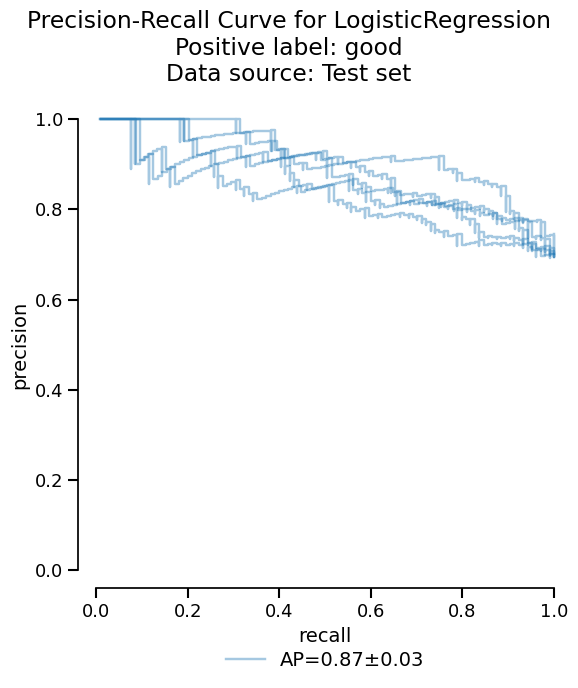
Or we can access the raw information as a dataframe if additional analysis is needed:
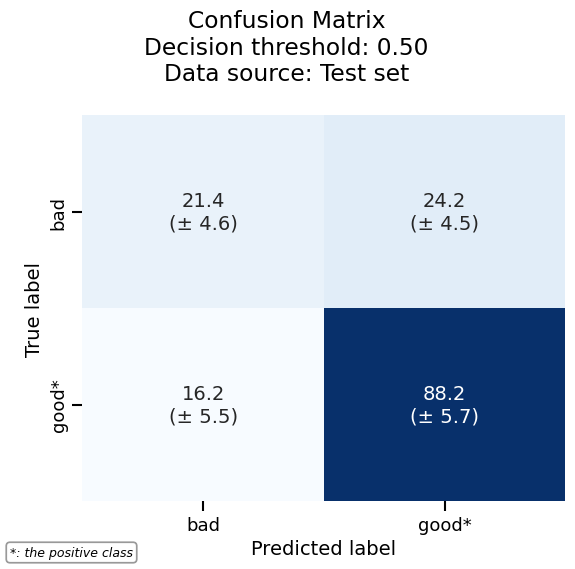
As another example, we can plot the confusion matrix with the same consistent API:
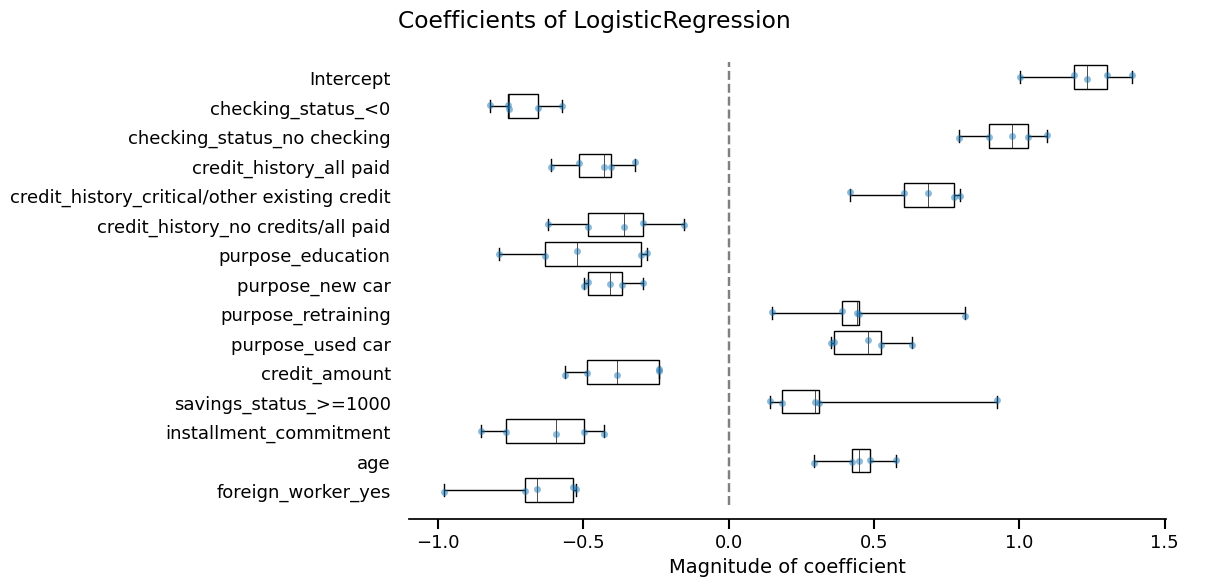
Skore also provides utilities to inspect models. Since our model is a linear model, we can study the importance that it gives to each feature:
coefficients = simple_cv_report.inspection.coefficients()
coefficients.frame()
coefficients.plot(select_k=15)
Model no. 2: Random forest#
Now, we cross-validate a more advanced model using RandomForestClassifier.
Again, we rely on tabular_pipeline() to perform the appropriate
preprocessing to use with this model.
from sklearn.ensemble import RandomForestClassifier

advanced_model = tabular_pipeline(RandomForestClassifier(random_state=0))
advanced_model
advanced_cv_report = CrossValidationReport(
    advanced_model, X=X_experiment, y=y_experiment, pos_label="good"
)
We will now compare this new model with the previous one.
Comparing our models#
Now that we have our two models, we need to decide which one should go into production.
We can compare them with a skore.ComparisonReport.
from skore import ComparisonReport

comparison = ComparisonReport(
    {
        "Simple Linear Model": simple_cv_report,
        "Advanced Pipeline": advanced_cv_report,
    },
)
This report follows the same API as CrossValidationReport:
We have access to the same tools to perform statistical analysis and compare both models:
comparison_metrics = comparison.metrics.summarize(favorability=True)
comparison_metrics.frame()
comparison.metrics.precision_recall().plot()
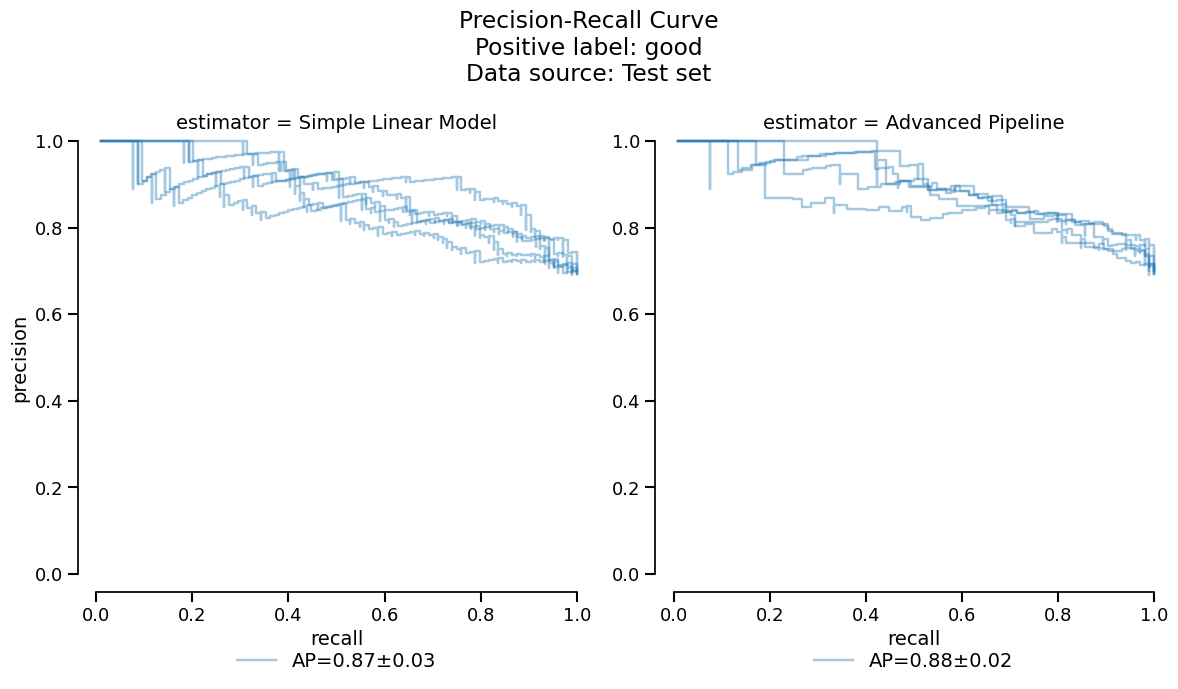
Based on the previous tables and plots, it seems that the
RandomForestClassifier model has slightly better
performance. For the purposes of this guide however, we make the arbitrary choice
to deploy the linear model to make a comparison with the coefficients study shown
earlier.
Final model evaluation on held-out data#
Now that we have chosen to deploy the linear model, we will train it on
the full experiment set and evaluate it on our held-out data: training on more data
should help performance and we can also validate that our model generalizes well to
new data. This can be done in one step with create_estimator_report().
final_report = comparison.create_estimator_report(
    name="Simple Linear Model", X_test=X_holdout, y_test=y_holdout
)
This returns a EstimatorReport which has a similar API to the other report classes:
final_metrics = final_report.metrics.summarize()
final_metrics.frame()
final_report.metrics.confusion_matrix().plot()
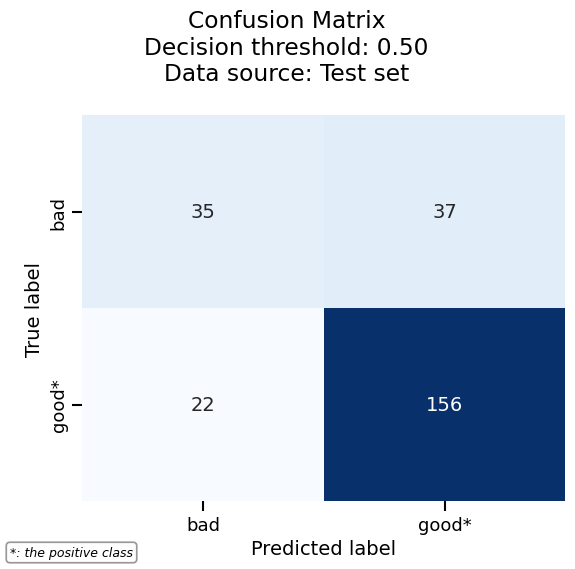
We can easily combine the results of the previous cross-validation together with the evaluation on the held-out dataset, since the two are accessible as dataframes. This way, we can check if our chosen model meets the expectations we set during the experiment phase.
pd.concat(
    [final_metrics.frame(), simple_cv_report.metrics.summarize().frame()],
    axis="columns",
)
As expected, our final model gets better performance, likely thanks to the larger training set.
Our final sanity check is to compare the features considered most impactful between our final model and the cross-validation:
final_coefficients = final_report.inspection.coefficients()
final_top_15_features = final_coefficients.frame(select_k=15, format="long")["feature"]

simple_coefficients = simple_cv_report.inspection.coefficients()
cv_top_15_features = (
    simple_coefficients.frame(select_k=15, format="long")
    .groupby("feature", sort=False)
    .mean()
    .drop(columns="split")
    .reset_index()["feature"]
)

pd.concat(
    [final_top_15_features, cv_top_15_features], axis="columns", ignore_index=True
)
They seem very similar, so we are done!
Tracking our work with a skore Project#
Now that we have completed our modeling workflow, we should store our models in a safe place for future work. Indeed, if this research notebook were modified, we would no longer be able to relate the current production model to the code that generated it.
We can use a skore.Project to keep track of our experiments.
This makes it easy to organize, retrieve, and compare models over time.
Usually this would be done as you go along the model development, but in the interest of simplicity we kept this until the end.
We load or create a local project:
project = skore.Project("german_credit_classification")
We store our reports with descriptive keys:
project.put("simple_linear_model_cv", simple_cv_report)
project.put("advanced_pipeline_cv", advanced_cv_report)
project.put("final_model", final_report)
Now we can retrieve a summary of our stored reports:
summary = project.summarize()
# Uncomment the next line to display the widget in an interactive environment:
# summary
Note
Calling summary in a Jupyter notebook cell will show the following parallel
coordinate plot to help you select models that you want to retrieve:
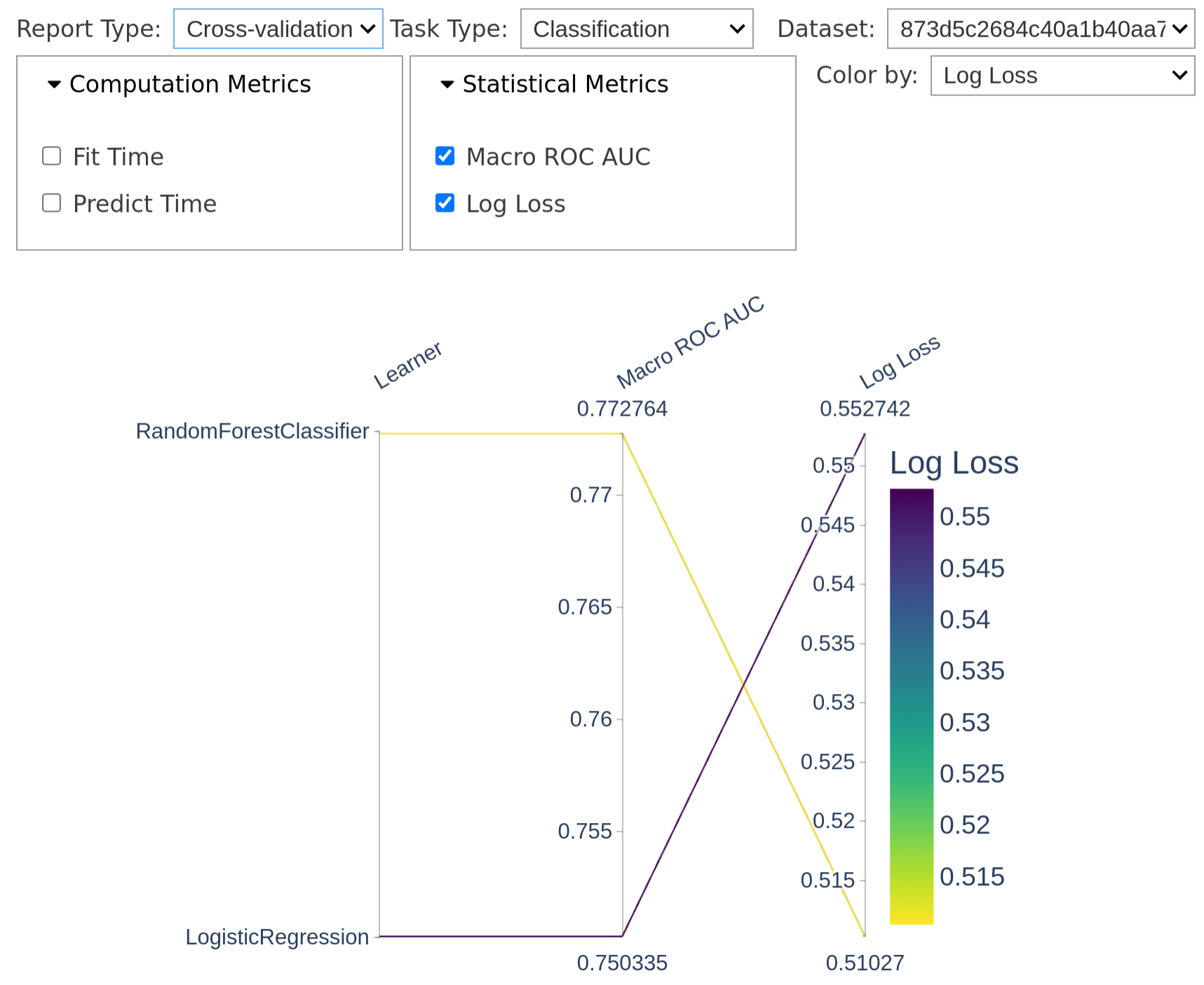
Each line represents a model, and we can select models by clicking on lines or dragging on metric axes to filter by performance.
In the screenshot, we selected only the cross-validation reports; this allows us to retrieve exactly those reports programmatically.
Supposing you selected “Cross-validation” in the “Report type” tab, if you now call
reports(), you get only the
CrossValidationReport objects, which
you can directly put in the form of a ComparisonReport:
new_report = summary.reports(return_as="comparison")
new_report.help()
Stay tuned!
This is only the beginning for skore. We welcome your feedback and ideas to make it the best tool for end-to-end data science.
Key benefits of using skore in your ML workflow:
Standardized evaluation and comparison of models
Rich visualizations and diagnostics
Organized experiment tracking
Seamless integration with scikit-learn
Feel free to join our community on Discord or create an issue.
Total running time of the script: (0 minutes 12.906 seconds)